
Managing Anonymised audiences and AudienceLift signals
You can select any pre-existing audience (segment) in Anonymised to send to Meta as an AudienceLift signal.
Follow these guides to learn more about creating Anonymised segments:
Prerequisites

Ensure you have requested the activation of AudienceLift from your client success manager or support.
Notify our representative of which Pixel setup you have enabled - core or non-core. For more information see this article.
Assigning an audience to AudienceLift
Login into your Anonymised Account.
Navigate to AudienceLift option on the menu
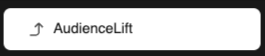
AudienceLift menu option
Click in the Select audience field.
Select the audiences from the drop-down list. You can select as many as you like.
Click Save button.

Example of Anonymised segments selected as AudienceLift signals
After 20 minutes or so, the corresponding custom events (AudienceLift signals) will appear in your Meta business account.
Maintaining AudienceLift signals
Click on the trash can icon to remove an Anonymised segment as an AudienceLift signal
Click Save.