
Anonymised UserSync Integration
Purpose
UserSync enables partners to safely associate their user identifiers with Anonymised’s internal UUIDs, allowing deterministic identity mapping while preserving user privacy.
Overview
Mechanism: Partners write their user ID into a localStorage key called anon-hndshk.
Anonymised tag: Runs on the page, reads anon-hndshk and, if present and consent conditions are met, calls the /v3/usersync endpoint.
Identity graph ingestion: The call links the partner ID, the Anonymised UUID, and the client ID (ID owner) for deterministic mapping.
Flow diagram
Partner Code → writes user_id → localStorage: anon-hndshk
           ↓
Anonymised Tag → checks consent & bearer token
           ↓
POST /v3/usersync → partner_user_id + anonymised_uuid
           ↓
Identity Graph stores mapping: client_id | partner_user_id | anonymised_uuid
Preconditions
Before a partner ID can be ingested:
Anonymised tag must be active on the page.
Ensures safe execution and access to anon-hndshk.User consent must be granted (TCF / GDPR).
Our tag will not read or transmit identifiers without consent.Bearer token must be present for the logged-in user.
Links the UserSync ingestion to a deterministic Anonymised UUID.
Steps for partner integration
Step 1: Implement partner-side code
Generate or retrieve the partner’s user ID (e.g., CRM ID, hashed email).
Write the value to localStorage under the key anon-hndshk, for example;
CODE// Example: Partner writes their ID to localStorage (function() { const partnerUserId = 'partner_user_12345'; // hashed or anonymised localStorage.setItem('anon-hndshk', partnerUserId); })();
Step 2: Ensure execution before Anonymised tag
Your code should execute before the Anonymised tag is loaded, else we will pick up the partner ID on the subsequent pageview.
This ensures our tag can read the anon-hndshk value and process it correctly.
Step 3: Do not attempt to send IDs directly
The partner code should never call /v3/usersync directly.
All ingestion is handled via the Anonymised tag, ensuring privacy compliance and authentication.
Behaviour of the Anonymised Tag
Checks for the presence of anon-hndshk in localStorage.
Confirms that:
The user has given consent.
A bearer token exists for the session.
Sends a POST request to /v3/usersync containing:
The IDs to be matched
The owner of the Partner ID
The endpoint maps:
CODEclient_id (assigned by Anonymised to the client) | partner_user_id | anonymised_uuidThe mapping can then be used to build membership audiences for targeting. See API documentation.
Key considerations
Privacy first: Only identifiers for consenting users are ingested.
Deterministic linking: Partner IDs for the same user are mapped to a single Anonymised UUID across the portfolio.
Token validation: The bearer token ensures that ingestion is authorised and cannot be spoofed.
No raw IDs shared externally: Partner IDs are only linked internally and never exposed outside the system.
Live example
Navigate to https://blog-website-for-cmp-test-lwvpr3pb6a-ew.a.run.app/
Accept the consent terms
If using Chrome, you can ignore this step, else click to open another tab and navigate back to the original tab.
Open Dev > Console and paste/execute the following code:
(function () {
    // Helper: read a cookie by name
    function getCookie(name) {
        const match = document.cookie.match(new RegExp('(?:^|; )' + name.replace(/([.$?*|{}()[\]\\/+^])/g, '\\$1') + '=([^;]*)'));
        return match ? decodeURIComponent(match[1]) : null;
    }

    // Helper: extract GA4 Client ID from _ga cookie
    function getGaClientId() {
        const gaCookie = getCookie('_ga');
        if (!gaCookie) return null;

        // _ga format: GA1.2.XXXXXXXXXX.YYYYYYYYYY
        const parts = gaCookie.split('.');
        if (parts.length < 4) return null;

        // Client ID = last two sections joined with a dot
        return parts[2] + '.' + parts[3];
    }

    // Helper: generate a random GUID
    function generateGuid() {
        return 'xxxxxxxx-xxxx-4xxx-yxxx-xxxxxxxxxxxx'.replace(/[xy]/g, function (c) {
            const r = Math.random() * 16 | 0;
            const v = c === 'x' ? r : (r & 0x3 | 0x8);
            return v.toString(16);
        });
    }

    // Main
    const clientId = getGaClientId();
    const guid = generateGuid();

    if (clientId) {
        const combined = `${clientId}:${guid}`;
        localStorage.setItem('anon-hndshk', combined);
    }
})();
Navigate to Dev > Application and check that the local storage key anon-hndshk is present and populated.
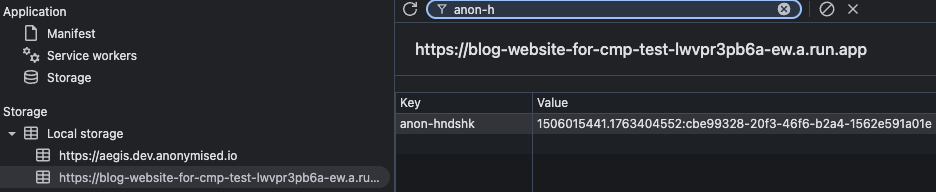
Presence of KVP anon-hndshk
Navigate to Dev > Network and check that the call to /v3/usersync has been made.

Presence of call to usersync endpoint